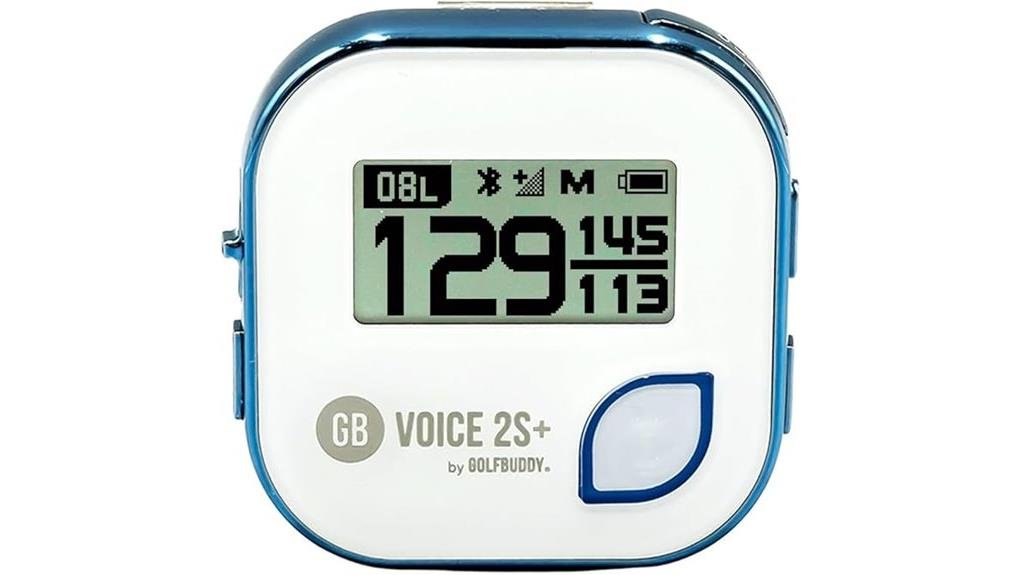
You’ll like the GOLFBUDDY Voice 2S+ if you want a simple, clip-on talking GPS that gives clear front/center/back yardages with one-button operation and stereo voice cues. It clips to a hat or belt, auto-detects holes from 40,000 courses, and logs shot distances, though yardages vary by a few yards versus laser precision. Battery lasts about 18 hours and it’s IPX3 resistant. It trades touchscreens for robust, hands-free reliability — keep going to see setup and real-world tips.
Some Key Takeaways
- Simple one-button talking GPS ideal for hat or belt clipping, designed for seniors and visually impaired golfers.
- Speaks front/center/back yardages, updates a 1-inch LCD, and measures shot distances reliably enough for club selection.
- Preloaded with 40,000 courses and automatic hole recognition, with occasional satellite drift near trees or buildings.
- Around 18-hour battery life (about three rounds); heavy voice use and cold can shorten runtime.
- Durable IPX3 splash resistance, QZSS-enhanced positioning, and stereo-capable voice for clear hands-free guidance.
Best Fit for Your Needs: Who Should Buy the GOLFBUDDY Voice 2S+ Talking GPS Rangefinder
If you want a simple, reliable talking GPS that clips to your hat or belt and tells you front/center/back yardages without fuss, the GOLFBUDDY Voice 2S+ is a strong fit. You’ll appreciate its one-button operation, lightweight clip, and clear voice guidance that reduce cognitive load on the course. It suits senior golfers seeking straightforward accuracy and visual impairment golfers who need dependable audio cues. You’ll join peers who favor practical, durable gear over bells and whistles. Choose this unit if you want inclusive, no-nonsense course navigation that keeps you focused, confident, and part of the game. It’s a practical option for handheld golf GPS enthusiasts who want essential, course-focused gear like handheld golf gps that prioritizes simplicity and durability.
What the Voice 2S+ Actually Does on the Course (Features and Real-World Use)
On the course, the Voice 2S+ delivers straightforward, hands-free distance data so you can make faster, more confident club choices: press the single button and it speaks front/center/back yardages while the 1-inch LCD updates in real time, clips to your hat or belt, or detaches for handheld use. You’ll get automatic course mapping and hole recognition across 40,000 preloaded courses, plus shot-distance measurement. Adjustable audio alerts keep guidance audible without distraction. Navigation is simple, the interface intentional, and the stereo-capable voice stays clear. You’ll join players who value quick, reliable info that keeps pace with your round. Many golfers choose dedicated GPS golf watches and devices to improve course management and confidence.
Accuracy, Battery Life, and Durability: Performance You Can Expect
While you won’t get laser-rangefinder precision, the Voice 2S+ delivers consistent GPS yardages that are accurate enough for club selection and course management, typically varying by only a few yards depending on satellite reception and course mapping updates. You’ll notice occasional satellite drift or brief signal interference near tree lines and buildings, but automatic hole recognition and QZSS support keep readings stable. Battery life runs about 18 hours—roughly three rounds—though heavy voice use and temperature effects can shorten runtime via accelerated battery degradation. The IPX3 build resists spray; treat it gently, and it’ll be a dependable clubhouse companion. This makes the Voice 2S+ a practical choice for golfers looking for a reliable golf distance tracker to manage their rounds.
How the Voice 2S+ Compares to Other Talking Golf GPS Devices
Although the Voice 2S+ doesn’t aim to match laser precision, it stands out among talking golf GPS units for its blend of simple one-button voice operation, QZSS-enhanced positioning, and long-ish battery life, giving you reliable yardages and straightforward audio guidance without the complexity or cost of touchscreen smartwatches or hybrid devices. In voice comparison, you’ll notice clearer, faster audio cues than basic clip-on models and longer runtime versus many wearables. Expect sensible feature tradeoffs: no touchscreen, modest display, but durable clip-on versatility and preloaded course coverage. If you want inclusive, no-fuss guidance, it fits the clubhouse. It also benefits from being tailored specifically for golfers, with preloaded courses and clip-on versatility that make it easy to use round after round.
Tips for Setup, Mounting, and Getting Reliable Voice Distances on Every Round
Now that you know where the Voice 2S+ sits among talking golf GPS units, let’s focus on getting it set up and mounted so you get consistent, accurate voice yardages every round. Clip the unit to your hat or belt where the microphone and speaker face outward; detachable design lets you reposition for comfort. Perform pre round calibration by powering on early for satellite lock and verifying hole recognition. Do voice volume testing at different levels (0–5) and in cart vs walk mode. Secure USB-charged battery, enable/disable slope per local rules, and confirm stereo output for clearer cues. Portable golf launch monitors are ideal for players who want to improve their game anywhere.
Some Questions Answered
Does It Support Metric and Imperial Distance Units?
Yes — you can switch units: Metric support and Imperial support are both available. You’ll set your preferred units in the device settings, and distances, voice prompts, and shot measurements will follow that selection. That gives you consistent feedback whether you prefer meters or yards. You’ll feel confident knowing the unit system matches your game and community, and you won’t have to mentally convert while you play.
Can I Update Course Maps via Smartphone or Only USB?
You can update course maps via USB; the device doesn’t support direct smartphone map downloads. However, you’ll still get course downloads and cloud sync through GolfBuddy’s desktop or web tools—then transfer files to the unit by USB. Rely on the official updater to manage cloud sync, keep courses current, and preserve your settings. You’ll feel connected to the wider player community while maintaining control and reliability during updates.
Is the Device Compatible With Hearing Aids or Bluetooth Headphones?
Yes — you can use hearing aids or Bluetooth headphones, but test compatibility first. The unit offers adjustable audio levels and stereo output for hearing compatibility; it supports Bluetooth pairing to stream voice guidance to compatible headsets. You’ll want to confirm your hearing aid’s Bluetooth profile (or use a streamer) since the device’s pairing may be basic. Try it on the range to make certain clear audio and comfortable volume before relying on it.
What Languages Are Available for Voice Guidance?
The device provides English voice language by default; other languages aren’t broadly advertised, so you’ll mainly get English guidance with limited regional accent options. You’ll want to verify current firmware or course-pack updates for added languages or accent packs. If inclusion matters to you, contact support or check update notes—being proactive guarantees the voice and accent options match your group’s preferences and keeps everyone feeling included on the course.
Can It Record and Export Round Statistics or Shot History?
No — it won’t record full round tracking or detailed shot logging on-device. You’ll get basic shot distance measurement and real-time distances, but the unit doesn’t store exhaustive round stats or exportable shot history. If you want round tracking and shot logging for analysis or sharing, you’ll need a companion app or a different device that supports synced scorecards and exportable histories. You’ll still enjoy simple, reliable on-course guidance.